
Shopify Multi-Market Pricing: Complete Guide for Global Stores
Selling globally opens up immense opportunities, but it also introduces complexities, especially when it comes to pricing. Different regions have varying purchasing powers, local tax structures, shipping costs, and competitive landscapes. Manually managing these nuances can quickly become a logistical nightmare.
Enter Shopify Markets, Shopify’s powerful suite of tools designed to simplify international selling. Combined with a robust app like the Smart Bulk Price Editor, you can seamlessly manage regional pricing, automate adjustments, and ensure profitability across all your global storefronts.
The Challenge of International Pricing Without Shopify Markets
Before Shopify Markets, managing different prices for various countries or regions was a patchwork process involving separate stores, complex manual adjustments, or workarounds that often led to:
- Currency Mismatch Headaches: Displaying prices in a customer’s local currency is crucial, but converting them accurately while maintaining margins is tricky. Simple currency conversion often doesn’t account for local market values.
- Inconsistent Margins: Without precise control, a “standard” discount might yield drastically different profit margins in different countries due to varied costs of doing business or local competition.
- Manual Update Overload: Updating prices product-by-product for each market is an impossible task for growing catalogs, leading to errors and delays.
- Missed Local Opportunities: Inability to quickly implement localized promotions means losing out on culturally relevant sales events.
- Customer Confusion: Inconsistent pricing or irrelevant currency displays can erode trust and increase cart abandonment.
Shopify Markets: Your Foundation for Global Pricing
Shopify Markets provides the infrastructure to truly localize your international selling experience. It allows you to:
- Set up distinct markets: Group countries into markets (e.g., North America, EU, Asia-Pacific).
- Localize currency and language: Automatically display prices in local currency and content in local languages.
- Manage international domains/subdomains: Present a professional, localized storefront.
- Control international shipping and duties: Simplify logistics and transparency for customers.
- Crucially, set pricing strategies for each market.
While Shopify Markets lays the groundwork, you’ll still need a tool to efficiently execute these pricing strategies at scale.
How Smart Bulk Price Editor Enhances Shopify Markets for Regional Pricing
This is where a dedicated app like Smart Bulk Price Editor becomes indispensable. It takes the capabilities of Shopify Markets and supercharges your ability to set, manage, and automate regional prices with precision and control.
Here’s how it helps you master global pricing:
1. Setting and Automating International Pricing with Ease
Smart Bulk Price Editor allows you to go beyond simple currency conversion. You can define specific pricing rules or exact prices for products in each market you’ve set up in Shopify Markets.
- Market-Specific Pricing: Instead of just converting USD to EUR, you can set a completely different price for a product in the EU market that reflects local demand, competition, or perceived value.
- Bulk Adjustments by Market: Apply percentage-based discounts or fixed price changes to entire collections or categories specifically for your UK market, independent of your US market.
- Scheduled Local Promotions: Plan and schedule seasonal sales, flash deals, or holiday promotions for specific regions. For example, a “Summer Sale” for Australia in December, or a “Winter Clearance” for Canada in February. The app ensures these go live and revert automatically.
2. Avoiding Currency Mismatch & Ensuring Local Relevance
While Shopify Markets handles currency display, Smart Bulk Price Editor helps you ensure the underlying price is strategically set for that currency.
- True Local Pricing: No more simply multiplying by an exchange rate. You can input exact prices in the local currency for each market, ensuring they look natural and competitive to local buyers.
- Dynamic Rounding: Some apps offer features to intelligently round prices to common local price points (e.g., ending in .99 or .00), which can impact conversion.
- Customer Trust: Showing prices in a familiar currency, that are also competitively set for their market, significantly boosts customer confidence and reduces cart abandonment.
3. Ensuring Consistent Margins Across All Regions
This is a critical aspect for profitability. Different markets often have different fulfillment costs, tax rates, or marketing expenses.
- Profit-First Pricing: By allowing you to set distinct prices per market, you can calculate and ensure your desired profit margins are maintained after accounting for all local variables.
- Cost of Goods Sold (COGS) Integration (if available): Advanced apps might allow you to factor in COGS per market, giving you a clearer picture of profitability when setting prices.
- Strategic Adjustments: If you find shipping to the UK is more expensive, you can slightly increase product prices in that market to offset the cost, while keeping prices competitive elsewhere.
4. Running Localized Promotions with Precision
Seasonal sales, holidays, and cultural events vary greatly across the globe. Smart Bulk Price Editor empowers you to capitalize on these unique opportunities.
- Targeted Discounts: Run a specific discount for Diwali in India, a Lunar New Year sale in Asian markets, or a Boxing Day special in Canada, all managed from a single dashboard.
- Automated Scheduling & Rollback: Set the exact start and end times for these localized promotions. The app will automatically apply the discount and revert prices, preventing costly errors or extended sale periods.
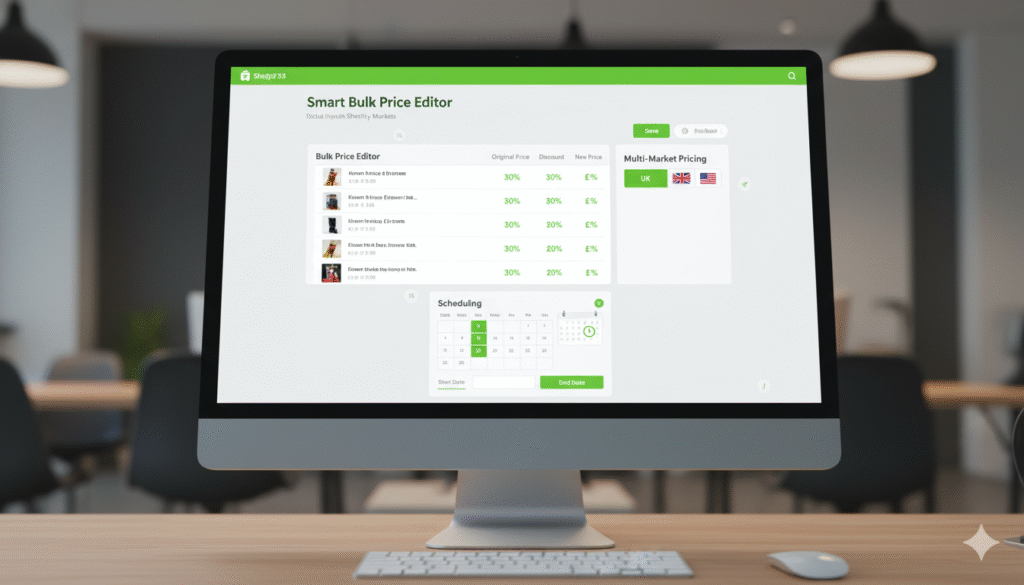
- Multi-Market Pricing Tabs with Flags: A well-designed app will display clear tabs for each market (e.g., USA, UK, EU) often accompanied by their respective flags, making it intuitive to switch between market pricing views and manage adjustments.
Here’s a visual example of how a Smart Bulk Price Editor dashboard might look when managing multi-market pricing: